
Saga Explorer
The Saga Explorer (/sagas) is the fleet-wide index of every saga your services host. Sagas already had rich per-saga pages — a workflow diagram and a per-instance replay — but no catalog telling you which sagas exist and where. This is that catalog.
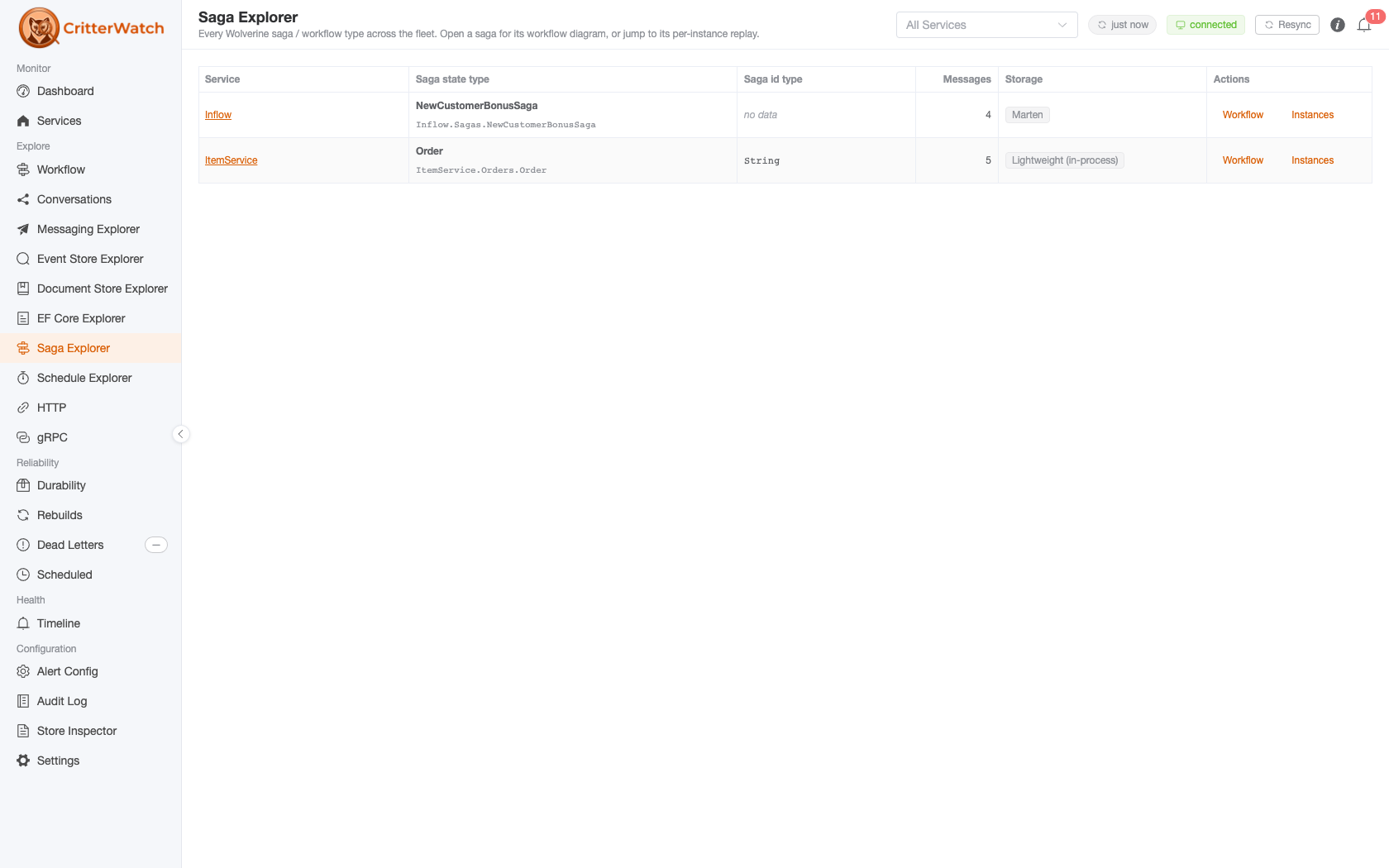
Route: /sagas. It is a peer of the EF Core Explorer and the Document Store Explorer: a flat, fleet-wide list that drills into surfaces you already have.
Scope
The explorer lists sagas across every reporting service by default. Narrowing to one service is done with the global service selector in the header — the same control every explorer reads, so a service you pick on one page stays picked as you move between them.
A ?service= deep link wins over the header selection on arrival and writes itself into the global filter, so a link you paste into chat lands your reader on the same scope you were looking at. Picking a service that hosts no saga leaves the catalog fleet-wide rather than showing you an empty table.
Only services that report at least one saga appear. If none do, the page reads "No services host a saga yet." — but note it distinguishes "no sagas" from "the fleet snapshot has not arrived yet", and shows a skeleton for the latter, so a cold load never claims your sagas are missing.
The catalog
One row per saga state type:
| Column | What it tells you |
|---|---|
| Service | The service hosting the saga. Links to that service's detail page. |
| Saga state type | The short type name, with the fully-qualified name beneath it. |
| Saga id type | The CLR type of the saga's identity (Guid, string, …), shortened to its final segment. |
| Messages | How many message types this saga handles — a rough read on how much of a workflow it carries. |
| Storage | The persistence provider backing the saga, as a tag (an em-dash when the service didn't report one). |
| Actions | The two drill-in buttons — Workflow and Instances (below). |
Rows sort by service, then by saga name.
Drilling in
Each row carries two actions:
- Workflow → the saga detail page, a Mermaid sequence diagram of the saga's message flow rendered from the service's reported saga capability. Static: it shows how the saga is shaped, not what any one instance did.
- Instances → the per-instance replay page, which lists recent traces for the saga filtered by its id-member tag (Wolverine's
{SagaName}Idconvention) and reconstructs a single instance's history, including scheduled re-entrances such as saga timeouts and deferred commands.
Sagas also appear elsewhere
A DbContext that stores sagas lists them as chips on its card in the EF Core Explorer, and per-service saga information stays available on the service detail page. The Saga Explorer is the fleet-wide entry point, not the only one.